Settings Dialog
Profiles
Starting from version 1.0 YADSync support multiple profiles. Just select the profile from the combo on the top of the dialog and then set it up (folders/exclude/options). Profiles int the combo-box are orderer alphabetically.
There is a profile called ‘Main profile’. As the name suggest this is the main profile and it can’t be remove or renamed.
Near profiles combo-box you have buttons to rename/add/remove profiles.
Folders tab


This tab allow you to add pairs of folders to synchronize.
To add a pair of folders select the ‘Source’ and ‘Destination’ and then press ‘Add’ button.
To remove a pair select it and press ‘Remove’ button.
Exclude tab


Exclude tab allow you to specify what to exclude during synchronize process.
Example: hiddens file (.*), backup files (*~).
Exclude patterns are global for all folders. There is not way to specify them per folder (at least not for the moment).
Options tab

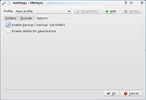
- Enable backup (‘.backup’ subdirectory)
If this option is set (default: set) will backup all files that need to be changed or removed in source/destination ‘.backup/
‘.backup’ folder is excluded during synchronize process.
- Enable delete for save/restore
If this options set (default: not set) a save/restore process allow to remove files during update. If ‘Enable backup’ is set, this files are not lost but moved in ‘.backup/